Tom is recently suffering from chest pain. Today he is with Dr. Michael for medical checkup. While talking his, Dr. Michael came to know that Tom had a heart procedure done few years back at Healthy Heart Institute and also ulcer related procedure at Good Body Medical Center.
To complete his medical investigation, Dr. Michael calls up Good Body Medical Center and asks for Medical records of Tom. Good Body Medical Center has all of its record online, Dr. Michael is asked to login to Good Body Medical Center and get the medical records of Tom. At Good Body Medical Center website to access Tom’s records, Dr. Michael is asked to provide Tom’s user name and passwords. Tom gave his user name and passwords to Dr. Michael who key in the details and get his all medical records.
In this case, Tom has no control over what information about his, Dr. Michael can access. It is ALL or NONE scenario. Apart from that if ever Tom changes his password for Good Body Medical Center website, Dr. Michael loses privileges to access his records until unless Tom passes him new password.
Now Dr. Michael requires data from Healthy Heart Institute. He calls to Healthy Heart Institute and asks for Tom’s medical records. Healthy Heart has little bit different way to access patient data.
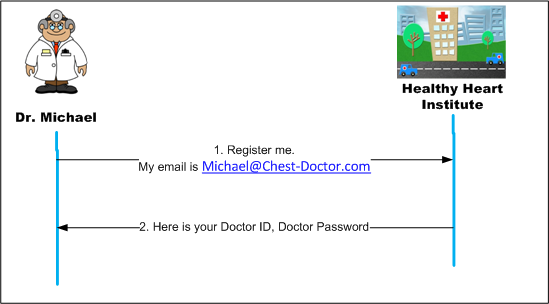
As first Institute asks Dr. Michael to register with Healthy Heart Institute and provide Email address where patient’s (not only Tom’s) medical records can be sent. Dr. Michael complies and provides Michael@Chest-Doctor.com as email address. In turn Healthy Heart Institute provides a Doctor ID and Doctor Password to Dr. Michael.
Now Tom log in to Healthy Heart Institute and shows desire to share his medical records (for heart procedure only, not for the toe surgery) with Dr. Michael. Healthy Heart Institute provides Authorization Code to Tom and asks him to email the same to Dr. Michael. Dr. Michael sends Tom’s Authorization Code, his Doctor ID and Doctor Password to Healthy Heart Institute using his registered Email address. In turn Healthy Heart Institute sends a unique token to Dr. Michael. Using unique token, Dr. Michael can now access medical records of Tom.
Next time when Dr. Michael needs medical records of Tom, he approaches Healthy Heart Institute web site and supply the Token he has for Tom. Similarly Dr. Michael can access records of other patients using his Doctor ID and Doctor Password and token to be provided by respective patient.
If you notice here, even if Tom changes his password for Healthy Heart Institute web site, Dr. Michael can access his data without any problem.
Now let’s visualize the understanding we got in terms of software systems.
OAuth is a set of specifications which allow one application to access information about a user (human or machine) from another application. OAuth is also used for cross authentication, means one can login into application using his facebook account. This feature essentially facilitates single user name and password across applications.
To understanding purpose, keep yourself at place of Tom; replace Dr. Michael with a blog which asks you to login into facebook to comment and Healthy Heart Institute by facebook.
Yash is essentially an
End User or
Resource Owner. He can be human or another computer. Blog is
Client who will access information about End User from Resource Provider (facebook). Doctor ID is now
Client ID. Doctor Password is
Client Secret. Dr. Michael’s email address is
redirect URI or
Redirect Endpoint. Facebook has two parts. Part one is
Resource Server which essentially means this computer has all data about
End User which
Client can access if
End User has given permission for the same. Part two is
Authorization Server which manages user name, passwords, permissions, and
Authorization Token about
End Users and
Client ID,
Client Secret, and
redirect URI about
Clients. We will be discussing
Authorization Endpoint and
Token Endpoint down the line.
In above picture Unique Token is not depicted. Unique Token essentially mapped to
Access Token and facilitates
Client (Dr. Michael/Blog) to access data about Tom/Yash (User). So if there is one more patients say Lucy with Dr. Michael and had some procedure at Healthy Heart Institute. In this case Dr. Michael will have a separate
Access Token for Lucy.
To facilitate, facebook login to post comments and show some info about Users, this blog needs to registers itself with facebook’s authorization server. Blog supply redirect URI to facebook authorization server and in turn gets Client ID and Client Secret.
So Yash is reading a blog entry and like to post his comments on it. This blog is using facility to post comments using facebook credentials.
This is first time Yash is going to post his comments on this blog so computers need to work little bit extra. Yash clicks on “login using facebook” button which results a pop up from facebook which prompts Yash to key in his facebook user name and password. On submit of pop up, Yash’s facebook user name, password & permissions (End User’s facebook credentials & permissions), blog’s (Client’s) Client ID, Client Secret passed to facebook. If all is well, facebook redirects Yash to a page (redirect URI) where he can key in his comments. Facebook also supplies an
authorization code to Yash. Under the hood, Blog gets authorization code from Yash and using that gets
Access Code and
Refresh Code from facebook.
Yash has posted his comments and moved on. But Blog has now access to his facebook account (not full but as per the permissions he has given like
user_about_me). Now Blog can access information about Yash even if Yash changes his password.
Do not panic! Yash can login into facebook and revoke permissions given to blog or invalidate the Access and Refresh Token.
In real life, Authorization server may not like to give an Access Token to Client which never expires. Also due to security concerns, permissions associated with Access Token may be less than the granted by User. To alleviate these concerns, at the time of issuing Access Token, Authorization Server also issues Refresh Token. Refresh Token is used to get fresh Access Token.
We have not discussed yet about
Authorization Endpoint and
Token Endpoint.
Authorization Endpoint is an URI which is accessed by
End User to authorize itself.
Token Endpoint is also an URL which is accessed by
Client to get
Access Token.
Holistically OAuth has brought standardization across web which facilitates:
- Standardized way of communication among applications for authentication and authorization purpose.
- User need not to share their credentials (username and password) to cross pollinate data across application.




 Posts
Posts


